
Xmas1.1 - App Store
You'll be able to see results in few seconds.
Publisher Description
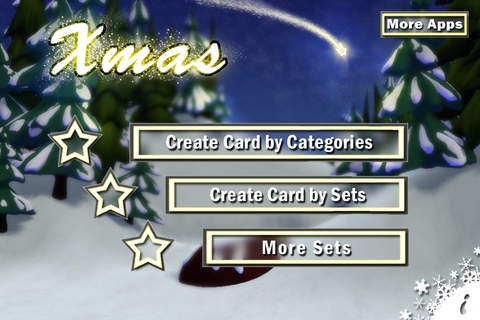
This App is this year s best way to greet your friends, relatives or co-workers. In no time at all you can create Christmas Cards using your cell phone. Sloppily made, lame greeting cards at yuletide are now a thing of the past.
Using Xmas iCard is very easy:
I.Shoot a photo, choose an image or select on of the backgrounds
II.Select a frame and choose one of the objects
III.If necessary, write your message
IV.Save it, send it, post it, twitter it, celebrate it...
Funny greets as well as reporting on your Christmas presents can be made in a unique and classy way of sending greetings to those you care about.
Based on the wide assortment of Christmas themes including custom backgrounds, frames and objects you can create your personal Christmas spirit as quick as possible. Moreover you can shoot a picture right from the app or use an existing photo.
The custom cards are sent as a JPEG attachment via email or can be delivered via MMS. In addition to that you can post them easily on Twitter and Facebook using our integrated function.
*****************
KEY FEATURES
Custom Xmas Card
Broad Choice of backgrounds, frames and Christmas decoration
Create iCards with your own pictures
Share with friends via email/MMS or on Facebook or Twitter
...and many more...
Requirements:
Compatible with
- iPhone 3GS and 4.
- iPod touch 3rd (2009) and 4th (2010) generation.
Requires iOS 3.0 or later.
Note: If you have any Problems installing the App, feel free to write us an email. Please provide information about your OS and your device and we will try to fix your problem as soon as possible!
Xmas iCard is your perfect Application for custom Christmas Cards and personal regards at Christmastide.
::: We wish you a very Christmas :::...
Requires iOS 4.2 or later. Compatible with iPhone, iPad, and iPod touch.
About Xmas
The company that develops Xmas is Nuromedia GmbH. The latest version released by its developer is 1.1.
To install Xmas on your iOS device, just click the green Continue To App button above to start the installation process. The app is listed on our website since 2010-12-13 and was downloaded 0 times. We have already checked if the download link is safe, however for your own protection we recommend that you scan the downloaded app with your antivirus. Your antivirus may detect the Xmas as malware if the download link is broken.
How to install Xmas on your iOS device:
- Click on the Continue To App button on our website. This will redirect you to the App Store.
- Once the Xmas is shown in the iTunes listing of your iOS device, you can start its download and installation. Tap on the GET button to the right of the app to start downloading it.
- If you are not logged-in the iOS appstore app, you'll be prompted for your your Apple ID and/or password.
- After Xmas is downloaded, you'll see an INSTALL button to the right. Tap on it to start the actual installation of the iOS app.
- Once installation is finished you can tap on the OPEN button to start it. Its icon will also be added to your device home screen.
Program Details
System requirements
Download information
Pricing
Version History
version 1.1
posted on 2010-12-13
Disclaimer
Official App Store Link
We do not host Xmas on our servers. We did not scan it for viruses, adware, spyware or other type of malware. This app is hosted by Apple and passed their terms and conditions to be listed there. We recommend caution when installing it.
The App Store link for Xmas is provided to you by apps112.com without any warranties, representations or guarantees of any kind, so access it at your own risk.
If you have questions regarding this particular app contact the publisher directly. For questions about the functionalities of apps112.com contact us.
